Tuesday, November 6, 2012

Experiencing Museums and Historic Sites Via Interactive Technology

I recently moved to upstate New York, near Fort Ticonderoga, a historic gem which I am embarrassed to admit neither my children, nor I ever had a chance to learn about in history books or visit in person until a few months ago. Although, my family and I have been lucky enough to do some extensive traveling in and out of the United States, after visiting the Fort, I began to think about so many places, museums, and historic sites, I will never have the opportunity of visiting and learning about in person, whatever the logistical reasons may be. 

However, I have realized interactive technology can make travel around the world possible for students of all ages. I started thinking about how web 2.0 encourages virtual travel when I learned about Thinglink.com, a tool that lets you upload images and make them interactive by adding links to any site be it music, video, text, or another image to enhance the original uploaded image. For example, view a picture of the Eiffel Tower on Thinglink with links to its sights, sounds and history. Thinglink.com got me thinking how traveling to exotic places, meeting new people and learning a new language or culture need no longer be hampered by logistics. Thinglink.com and other web 2.0 lets students become armchair travelers, well traveled curators of information from around the world.

Exploring the features and possibilities for learning with Thinglink.com, I also got to thinking:
  • How are museums and historic sites around the world using web 2.0 and social media to make their sites more accessible for a virtual experience? 
  • How are museums and historic sites distributing their exhibits, history and instruction to reach visitors far beyond their physical walls? 
  • How are educational programs in these organizations leveraging the power of free web 2.0 tools, social media and MOOCS to expand learning on a global scale for students of all ages and means? 
  • How globally participatory and networked are the current program in museums and famous sites around the world? 
Seeking answers for my questions, what I discovered available in terms of virtual tours of natural landmarks, historic sites and museums left me as amazed as if I were visiting the places themselves. First, let me tell you about the Google Art project and Google World Wonders Project. With Google Art, I didn't have to drive four hours to visit The Museum of Modern Art in New York city. I took an up, close and personal tour, observing every brushstroke of Van Gogh's Starry Night without ever leaving my home thanks to the same technology Google uses when we zoom in and out of Google Maps.  


The Google Art Project works in conjunction with 17 museums worldwide which integrate web 2.0 tools and social media to increase virtual and physical visitor accessibility, engagement, connection and learning to create a global community.  Virtual visitors can sign into their Google accounts to curate their favorite pieces from different galleries, post comments and then share via social media. How cool is that!    

Second, Google World Wonders took my breath away! Using the Street View technology of Google Earth and Google Maps, aptly named Google World Wonders gives virtual visitors a 360 degree view of 132 historic natural and man made sites in 18 countries, including StonehengeYosemite and Yellowstone! And, just when I thought it couldn't get better than this, the site also provides educators with free primary and secondary sources, presentations and lesson plans! Teaching history, geography or any subject really takes on a novel approach because students can now virtually visit world sites and not just imagine what they look like from looking at a 2-D picture in a book. 

With MentorMob another free web 2.0 that lets you curate what you want to learn about, making virtual travel possible as well by creating or visiting playlists of favorite audio, video, text, or image links, I have created a playlist of Virtual Field Trips available for students. 

Free web tools like Thinglink.com and MentorMob allow students to travel around the country, let's say from Crater Lake, Oregon to Mount Rushmore, or basically anywhere you can think of, seeing, hearing and experiencing the sites through audio, and video links that take people there virtually. Now, for the purposes of this post, I explored MentorMob and Thinglink, but imagine the myriad of free web 2.0 tools historic sites and museums can use to make learning accessible not just for K-12 schools in a particular region, but for K-12 schools around the world.  Imagine the partnerships schools can form with these organizations to hold virtual field trips and chats using social media engaging in a learning experience that may not otherwise happen in the physical world due to costs.  Through an endless array of interactive tech including, blogs, wikis, FaceBook, LinkedIn, Pinterest, ScoopIt, etc., museums and historic sites can extend their experience well before and after a physical or virtual visit through forums, message boards,image, video and audio sharing. The possibilities for engagement are never ending!     

Here is a playlist of museums that are already taking advantage of offering a virtual experience, and sites which offer videoconferencing for virtual field trips to other places of interest. Also be sure to visit NoodleTrip.com, an online directory of virtual field trips and distance learning opportunities. From an interactive tour of the White House, to the inside of the Sistine Chapel, the opportunities for virtual learning through virtual tours are limitless! 


Create your own Playlist on MentorMob!


I also want to include information about an interesting article I read on MOOCS. Again, I think about the power of open source education, and its future use by historical sites like Fort Ticonderoga near my home, and thousands of other museums and historical sites around the world where the possibilities for teaching and learning for students of all ages are endless.  What if museums and historic sites began offering their workshops via MOOCS?
  • How are historic places and museums beginning to use web 2.0 tools so that students don't have to just dream of ever visiting these notable sites? 
  • Will there ever be a time when anyone can visit a noteworthy site and learn virtually regardless of logistical issues?  
In an ideal world, no one should ever be denied the opportunity travel the world to learn because they don't have the means to do it; interactive technology opens up opportunities for virtual travel  because we all deserve the experience to discover our shared human history. If museums, and historic sites exist to remind us of our past, present and future and inspire wonder about our existence...if we want to learn, evolve so we are more globally connected and tolerant, then we should all have access to experience these sites, whether physically or virtually. Interactive technology invites us to explore the world together! 


Tuesday, October 30, 2012

Tech Complements Writing Conferences Critical for Writing Growth

Teaching writing does not have to be this way:
  1. Assign a random or irrelevant writing prompt with teacher as sole audience or an unknown audience.
  2. Expect impeccable writing skills from every student. 
  3. Skip any type of modeling of the type of writing to be done. Students should all know how to write by now. 
  4. Provide no rubric, or checklist or give rubrics and checklists students don't understand. 
  5. Complain when students don't live up to high expectations; blame the previous year's  teacher(s) for students' inability to write. 
  6. Accumulate piles of student writing assignments on or underneath desk, on empty book shelves, all over other classroom spaces, or scatter them on floor of the backseat of a car. 
  7. Tell students and parents you have a tendency to lose writing assignments so they need to keep extra copies.
  8. Procrastinate grading student writing for months.  Spend weekend before grades are due grading students' writing, including lengthy comments on every student's paper about skills students are clueless about.
  9. Mark up almost every grammar mistake in red, purple, pink or green. 
  10. Return writing assignment a month later with a letter grade; let students trash it, or file writing away in student folders never to be seen again.  
Repeat every few weeks, and complain all year students can't write to save their lives!

RESULTS:
So many students can't write to save their lives! "Only roughly one quarter of eighth and 12th graders are proficient in writing, according to results from the National Assessment of Educational Progress' first-ever computer-based writing assessment." 
  • How do students learn writing is a process without ever speaking to their teachers at different stages of writing? 
  • How do students learn how to interpret and apply feedback to correct mistakes and grow as writers if writing is returned to them without any chance of conversation to understand and correct errors? 
So many students develop a negative attitude about the writing process and their own ability to express themselves in writing because there is no modeling or discussion at different stages of the writing process. Prompts are assigned; students write in isolation; teachers grade and return writing without discussion; writing piece is never seen again. Then, we wonder why so many colleges now require freshmen writing courses to ensure students have basic writing skills to survive.

SOLUTIONS:
One of the most important activities when teaching writing is the act of conferencing with students.   In so many classrooms, overcrowding, time constraints, and lack of teacher training in teaching writing, among other factors, prevent students from experiencing what it means to talk about writing so they can grow as writers. There's nothing more damaging to student writers, especially a struggling reader/writer, than a writing assignment without any teacher modeling of the type of writing to be done, and no opportunity to talk with the teacher throughout the writing process.

Individual writing conferences with students serve many purposes, save time in the long run, and improve students' writing ability, and confidence in the power of editing and revising. In the beginning stages, conferencing with students involves concerted time and effort for the teacher to establish routines and structures for students to internalize. Conferencing is not easy and can be exhausting at first; however, the time and energy teachers dedicate to teaching the act of conferencing are well worth it because ultimately, student teacher conferences reduce the amount of time teachers spend identifying fault in student writing so they can focus instead on what's right.  

There are many tech tools with specific features which facilitate and complement writing conferences. For example, on Word or Google Docs, teachers can use the "Insert Comment" feature to add feedback prior to a face to face writing conference.  Adding these written comments and following-up with a conference to discuss the comments are always the most effective way for students to benefit from the feedback; otherwise, written feedback, without a one-on-one discussion, will often fall on deaf ears...or should I say eyes. Struggling writers will rarely read teacher comments or understand how to apply the feedback to improve their writing because they simply haven't been taught how. There has to be an opportunity to talk with the teacher about the feedback for growth to occur. We want students to internalize basic writing traits but circling them in red ink accomplishes nothing; we have to talk about the mistakes with students individually or in small groups. We must ask students questions as they write so they learn how to ask themselves questions.

Unfortunately, so many classrooms are often overcrowded with 40 plus students making conferencing difficult, but teachers must find creative ways to overcome this problem.  Here are some tips for formal and informal writing conferences:
  • If class time is not long enough, use tech tools like Vyew.com, Skype, Collaborizeclassroom,  or Google Hangouts to hold individual writing conferences after school while students are at home. You can even involve parents if you like to participate during the writing conference.
  • Pair up students according to their writing strengths and challenges so they can mentor each other prior to their individual conference. Be sure not to pair an extremely low student with an extremely high achieving student. The point is not for one student to do all the work for another, but rather for both to be able to help each other identify areas for improvement.  Model what effective peer editing looks and sounds like. Provide students with a list of questions they need to ask themselves and their partner about each others' writing. Have students read their writing aloud.
  • Plan ahead and prepare. What will students do while you are busy conferencing with individual students? Prior to holding conferences, provide specific instruction of writing tasks students should perform independently, in pairs or small groups. Discuss norms beforehand and let students know exactly what you expect them to do. Be sure to discuss what you expect in terms of noise level, interruptions, mobility and work completion while you are conferencing.   
  • Structure informal and formal conference sessions so students receive the time and attention they need. Walk around the classroom, stopping by to "chat" with students as they write to monitor student progress, answer questions and provide encouragement. Determine at what stages in the writing process you want to formally confer with students or set up a sign-up sheet so students choose when they are ready to confer. Also, determine how you will follow-up when necessary. Spend between 5 to 15 minutes per student in class, but obviously, if students need more time, schedule a time before, after school, in person or online using one of the tech tools mentioned.  If students are working on a longer piece, prior to conferencing, reading through a writing piece to pinpoint skills or traits you want to address saves time as well as having students generate questions they want answered about their writing. Having a checklist of traits and questions to address during the conference can also help move the conference along smoothly.  
  • Monitoring and assessing mastery of skills can also be done through conferencing. Keep notes on each student about the skills or traits discussed at each conference. If you identify a particular skill a student needs to master, make note of it and follow up with that student to assess student mastery. During the editing and revising process, allow students plenty of opportunities to write drafts until they are able to show mastery of the skill or trait discussed. 
  • Focus on a few traits or skills at a time so that the entire writing workshop process is not overwhelming for both teacher and student. The goal is for students to show growth even if  it's just one minor aspect of their writing. Significant growth will happen over time after extensive writing practice and opportunities to conference.  
Writing Conferences allow TEACHERS to:
  • identify individual students' writing strengths and challenges.
  • build rapport, gain student trust and instill importance of writing as a process.
  • listen to student attitudes and concerns about writing 
  • ask students questions about writing craft
  • pinpoint specific writing traits to teach, reteach and reinforce individually, or in small or large groups.
  • share, discuss and explain specific examples or solutions with students tailored for their individual writing challenges.
  • personalize and differentiate instruction by focusing on what each individual student needs to successfully engage in the writing process.
Writing Conferences allow STUDENTS to:
  • ask and answer questions about the writing craft they may hesitate to ask in a large group. 
  • discuss specific aspects about a writing piece at various stages of the writing process.
  • brainstorm ideas with the teacher's guidance.
  • read writing aloud to the teacher to learn how to edit and revise.
  • learn why we write and how to improve their own writing.
  • learn how to interpret teacher feedback and generate feedback for a peer.
  • learn how to carry out the role of peer editor through the experience of the teacher-student conference. 
  • internalize specific writing skills because of the opportunity to talk about, practice and apply the specific skill. 
If we want our students to be effective writers, then we must talk with them about their writing. We must be introspective about how we teach writing, so we can teach students to become introspective about their own writing. Writing cannot be a silent or solitary activity. Regardless of age or ability level, all students have a voice worthy of expression in writing.   Tech tools today complement writing conferences and help teachers overcome whatever issues may have prevented writing workshop success in the past.  Writing conferences build a community of writers and thinkers. When we empower students to talk about writing, students' natural desire for self-expression will always prevail over choosing to be off-task.


Create your own Playlist on MentorMob!

Saturday, September 29, 2012

Socratic Seminars Succeed With Tech Tools!

Over 2400 years ago Socrates figured out that: 
  • Lectures are boring and should not be the sole means of imparting knowledge
  • Regardless of grade or ability level, all students can learn, and learn best when given the opportunity to express themselves, reflecting on what they already know, connecting what they know with what they are learning, and analyzing why they think the way they do. 
  • Students learn best when they have opportunities to be social, engaging in lively discussions not necessarily debates, but through dialogues with peers and teachers.
  • When students are taught how to analyze text by asking and answering questions thoughtfully and thoroughly as they read, they learn how to think for themselves and internalize the skill of finding evidence to support responses.  
  • When students are exposed to a variety of meaningful, relevant written and non written texts, they learn there are multiple perspectives for every topic. 
  • When students learn how to think, not what to think, they can express and support their values and beliefs with evidence, and learn to listen and respect others' beliefs, values, knowledge and logic as well.               
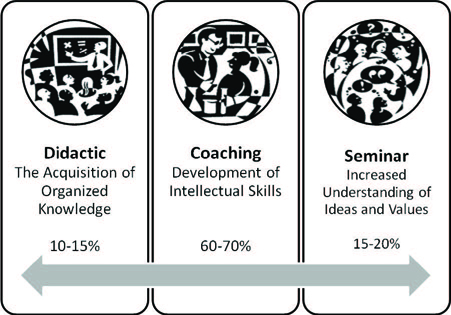
For some reason, these beliefs didn't quite stick in American education for awhile, and it wasn't until the 1980s, when philosopher and educator Mortimer Adler wrote The Paideia Proposal: An Educational Manifesto that more educators began to learn more about the Socratic or Paideia Seminar as the strategy is also called, from the Greek Paideia, meaning education or upbringing of a child. If this philosophy enabled students to not only practice reading, writing, speaking, listening, but also provided an opportunity for social participation in dialogues with peers and the teacher as coach, why did more teachers not implement this pedagogically sound strategy in the past? If it worked for Socrates, how could it fail?  The answers are varied and complicated, but here's mainly why:
  • Some teachers are often scared to turn control of the classroom over to students, which is one of the Paideia principles. 
  • Some teachers often think low achieving students can't possibly have anything thought-provoking to say.
  • Some teachers often think discussing the answers takes precedence over pondering how questions presuppose other questions.  
  • Some teachers often don't respond to student questions with further questions. They may think the teacher must simply give the answer.
  • Some teachers don't know how to stimulate thinking by teaching students to generate original questions. 
However, all of these fears can be put to rest when teachers begin to trust how the Paideia principles are rooted in the fact that all human beings have a natural desire to learn, and we all seek knowledge under the right conditions. The most difficult task falls in the teacher's hands to create inspirational conditions motivating students to want to learn. Teachers who take the time to find meaningful and relevant text can succeed in reaching even the most difficult student because the innate thirst for knowledge and expression will always prevail over apathy. Fortunately, more and more educators have recognized the error of their ways in ignoring the potential of Socratic discussions, and are successfully leading intelligent conversations supported by various technologies.

Socrates would definitely smile if he saw how our technology enhances the Socratic Seminar to the Nth degree. Discussions are no longer confined to the four walls of a classroom. With synchronous and asynchronous web tools, Socratic Seminars become ongoing global conversations extending well beyond the school day. Technology has also made it easy for our shy students, our ELLs, and any student facing academic challenges to participate as actively as the most advanced.

Socratic seminars encourage students to internalize the art of divergent thinking as they analyze print or non print text. The technique motivates students to engage in discussions, not debates, through open-ended questions that have no "right answers" but can be answered effectively if the student proves his/her point with textual evidence.  

Please visit this Livebinder filled with resources for carrying out Socratic Seminars in your class.


Tech Tools Enhancing Socratic Seminar Experience. 

Annotation/Bookmarking Tools
Before students engage in a Socratic discussion, they must closely read or watch a text, annotate, take notes about the text, generate original questions, or answer the teacher's questions, recording these task on paper, sticky notes or index cards. In the 21st century class, the following bookmarking tools make it easy for students to read, take notes, annotate, record and share their textual evidence to support their responses.

1.) Diigo.com helps students understand how to properly find relevant content, underline/highlight that content, and then remember it. Diigo.com has add-on tools for a variety of browsers,  so students can collect specific content while browsing the web and then add it to the My Library Cloud in the Diigo.com server to be accessed again and again. When students find information they need, they can digitally highlight the text, add an interactive sticky note with their comments, or questions, and save it to My Library Cloud for future use.  Students can also bookmark a page and organize pages by tags. They can label a page mark to read later if they want the teacher to approve the relevancy of the text first, and even archive a page so it's there forever. Diigo.com's facilitates active e-reading because of the annotation feature using e-sticky notes as well as the capture feature which lets students capture an image of a particular section of text, then use shapes, arrows or text for students to annotate. Diigo.com lets students revisit their highlighted content using their computer, I-Pad or smart phone, and share their selected content with others for collaborative projects.

2.) Marker.to-helps students to highlight and share evidence for their arguments via Twitter and Facebook. A class can have a Socratic discussion enhanced by Twitter.  For example, the teacher opens the class Twitter page on the smartboard to see the class Twitter stream. Marker.to makes it easy for students to revisit corroborative content they highlighted, click share via Twitter, and voila the entire class now has full view of the highlighted content.  Marker.to also gives you the option to organize content through tagging, so students can easily find, highlight and tag their textual evidence prior to a discussion and easily access it when needed by searching the tags. 

3.) Webklipper.com  also helps students to highlight, annotate on virtual sticky notes, and share evidence to support their responses in a Socratic discussion. The site needs no registration, but like Diigo.com, if students do register, they can save their content on the site to access later.  Webklipper.com also allows sharing via Twitter or Facebook. Again, teachers can show the real time streaming of comments and content highlighted by students to enhance the seminar experience.  

Back channeling in a Socratic Seminar-  During a Socratic Seminar, only one student should speak at a time. While students listen to each speaker, anyone of these tech tools allows students to write their comments and response for the questions posed by the seminar's facilitator, and respond to whatever each speaker says. Students can add their notes, links for textual evidence, and general thoughts about the discussion as they listen to each speaker. The teacher will also have a record of every student's thoughts as they listen to the discussion. 


Twitter                Hootcourse          Twebevent
Facebook            Micromobs          Collaborize Classroom
Socrative            Elluminate
Edmodo              Neatchat


Enhance your Socratic Seminar with a Guest. Invite parents, authors, administrators, another class in another state, or country, community partners and experts in the field to join a Socratic Seminar. 

Asynchronous tools to extend discussions beyond the school day.   On some occasions one class period may not be enough to have a thorough discussion of a topic. The best Socratic Seminars are the ones where students raise more and more relevant questions exploring a topic thoroughly.  Why not use one of these asynchronous tools to continue the conversation at home or to invite a guest to add his/her thoughts. Capitalize on students' excitement to discuss a topic by posing all of the questions which may have gone unanswered due to time constraints. 
Blogger              Wallwisher             Edmodo                                 Facebook
Voicethread        Wikis                     Collaborize Classroom         Twitter
Voxopop             Google Docs          Elluminate                             Box


Please share how you have used synchronous or asynchronous tech tools to support Socratic Seminars in your class. When our students have opportunities to engage in intelligent dialogue with their peers and teachers on a variety of subjects, they acquire the lifelong skill of divergent thinking which is at the core of our democracy. 

Monday, September 24, 2012

Technology Takes the Bite Out of Grammar!

One of my pet peeves about the teaching of grammar is hearing educators complain year after year that students can't spell, punctuate, distinguish a verb from a noun, write a sentence...
yada, yada, yada. Educators pass the blame from grade to grade, yet many students reach the 12th grade with below average grammar skills unable to write or speak coherently.    


The truth is if students don't have plenty of opportunities to practice and apply a particular grammar skill in context, a million grammar handouts or workbook exercises will not help them retain the basic grammar skills necessary to be an effective writer, speaker, reader, and listener.

If even above average readers who often exhibit an innate ability to decipher language rules struggle with grammar, many of our below average readers just give up on ever learning proper conventions and mechanics because grammar is often presented as a BORING, futile exercise with no real world application. When teachers use grammar as busy work in their emergency substitute plans, or even express their own fears about teaching grammar or writing, we send the message to kids that grammar just bites! 

We can't avoid teaching grammar! We must learn to teach it through writers' workshop, mini lessons, and every chance we get for students to connect the fact that grammar is part of writing, speaking, reading and even listening. We have to find ways to show kids how proper grammar is essential for communication, and how society perceives those who don't speak properly. We must teach students how to carefully analyze written and spoken language in search of those incidental "Teachable Grammar Moments" which exist all around us if we pay attention. Take the AllState insurance commercial slogan with the dangling modifier: "Dollar for dollar, nobody protects you from mayhem, like AllState!" and their older slogan,"You're in good hands". Both of these slogans are real life examples of grammar gone good and bad, and present the perfect occasion to discuss the confusion caused by dangling modifiers, and the most commonly confused contraction and adjective in the English language. Discussions about slang are also a great way to analyze the social stigma improper grammar can create for a job seeker. Students can keep a slang book and find more fitting synonyms, or grammatically correct expressions. Role playing scenarios, such as filling out a job application and interviewing for a job using slang vs. proper grammar help students see that there's a time and place for different types of proper and improper language, and someday their livelihood will be affected by their use of grammar.

Texting and Twitter do not have to undermine grammar instruction. Instead educators can leverage the power of both to reinforce grammar skills since they require students use written language. If anything, I think in some ways students' writing skills have benefitted from the texting craze because they are forced to write, albeit, the writing may not always be correct, but it's our job to help students hone their skills using a technology they enjoy. Assigning students to send grammatically correct texts to each other in class, or translate text language is an excellent way to quash once for all the stereotype that grammar is BORING.    

If we ask students to pay close attention to how grammar is used accurately and inaccurately all around us in signs, ads, commercials, songs, conversation, basically whenever we use language, it's pretty neat to see how kids enjoy the job of becoming grammar police!  We just have to find and present these opportunities for them. Technology makes it easier for us to do so, and for students to create content so they can apply what they learn.

Grammar has been the victim of a smear campaign for decades because it's not taught properly. Students are not always taught to create original content so they can exercise their ability to use a particular grammar skill, but technology can change that. Whenever students create original content using a tech tool, there should always be a written component affording students grammar practice, editing, revision and ultimately, demonstration of mastery of the grammar skill in the final presentation/publication of the content.

Here are some excellent grammar sites for students. But remember, we want students to create content where they apply the grammar skills they are learning. Some sites offering grammar practice can become glorified substitutes of the routine handouts or workbooks, so we must be careful not to trade one for the other.

Grammar has had lots of positive publicity thanks to sites like:
Grammar Girl  
Roxy from North Carolina follows us! 
Please follow @grammardogs on Twitter, and have students, parents, teachers and administrators tweet a picture of a pet(s) with a sentence showing application of a particular grammar skill. For example, here's Roxie from North Carolina showing us how to use state of being and action verbs.   

The goal is to create a gallery of pet photos, organize them by grammar skill, and share them so students can have fun reading and creating original sentences, applying grammar in a real life context! 

Buster, from Virginia follows us!  


Cats are welcomed!
Throw us a bone at @grammardogs 
because grammar doesn't have to bite! 

Check out our Picasa photo gallery! 
https://picasaweb.google.com/lh/myphotos


Here is also an iPad app http://showme.com which allows students to create content and teach their peers.  Check out my "showme" on sentence types! 

Credit: http://www.quickmeme.com/Condescending-Literary-Pun-Dog/?upcoming

Friday, September 21, 2012

Two Cents in Twitter Chats, Priceless Results!

As I have become more actively involved in the education world online, joining Twitter, participating in chats like #edchat, #engchat, meeting like-minded colleagues who share my passion for education and technology, I have realized all is not lost in education reform. Twitter chats like #edchat and others are instrumental in creating the impetus we need to once and for all effect change for the better. While the physical world struggles to provide quality education for all our students, the virtual world of education showcases the creme of the crop in terms of passionate and creative individuals, teachers and administrators alike, with a willingness to share what they know so we can all hone our craft and elevate our profession. If only more educational stakeholders discovered the value of technology integration in education, Twitter chats, in particular, imagine the gains our students could make. 

Twitter, blogging and the online education world empower me to share my expertise, and learn something new everyday. Participating in Twitter "edchats" has made me realize how powerful educators can become to mobilize others for educational reform. I entered the virtual world disheartened by the public school system, but not only have I found a voice to continue to make a difference for kids and education, I have discovered there are millions of talented teachers and administrators who care and are changing education for the better.

If you have not had an opportunity to participate in an Educational Twitter chat, make time to experience the benefits of these virtual professional learning communities. You'll come away with dozens of resources, tips and strategies. Please visit Cybraryman's Educational Website to see the catalogue of Twitter chats and the days and times these groups meet. Whether or not you decide to tweet your two cents or read others', you're guaranteed to interact with talented educators and learn something new.

Visit Cybraryman's page "How To Take Part In or Moderate A Twitter Chat" 

Please view my short video on what are educational Twitter Chats and Hashtags.  Hope to hear your two cents on Twitter soon...tweet me @trendingteacher; the experience is priceless!

Thursday, August 16, 2012

Differentiation With Pinterest: Promote Personalized Reading Plans

Pinterest.com has emerged on the social media scene with a million and one uses, but one of the best ways to take advantage of this tech tool is for differentiation to build students' reading confidence and interest. When we face the challenge of having unskilled or reluctant readers in our classrooms, Pinterest.com can help us organize reading selections for individual students. Unlike other bookmarking tools, Pinterest.com is more visual.  Imagine, a virtual cork board and the ability to have as many cork boards as you want. A teacher using Pinterest.com can create various virtual bulletin boards for as many topics as he/she would like, e.g.  a board showcasing vocabulary definitions and examples, a board with links to pieces of literature, a board with non fiction selections or showing examples of grammar in context...you get the idea. After adding the Pinterest.com bookmarklet to your browser, as you browse the web and find content you like, you can "pin" the content to the Pinterest.com cork board of your choice.  

For teachers, this means as you search for high interest content for reluctant readers, you can organize the content by category or even create personalized boards for each student adding content catered specifically for the student's specific learning needs.

What's even better about this site is the ability for users to "repin" content, which means that if a student enjoys a particular pin the teacher recommended, using his/her own Pinterest account, he/she will then be able to add it to his/her own pinboard. "Repinning" becomes a sort of virtual recommendation of content, and we all know students will listen to their peers' recommendations any day over ours. The trick is to find interesting content to catch students' attention so that then they will repin and promote the content to their classmates.

I have started a Pinterest.com Board for Vocabulary to teach Literary Terms, and a Common Core Reading Selections Board for Grades K-12. I have started pins linked to the high interest content for all grade level readers recommended by the ELA K-12 Common Core Standards. Anyone is welcomed to "repin" the content! Pinterest requires an invitation only sign up, but invites are sent promptly. Hope you'll follow me on Pinterest.com  and begin pinning with your students!
http://pinterest.com/fearlesstech/


Also check out Edutopia's Five-Minute Film Festival on a million more uses for Pinterest!
http://www.edutopia.org/blog/film-festival-pinterest-teaching-learning

Related Posts Plugin for WordPress, Blogger...