Friday, November 16, 2012


Wednesday, November 14, 2012
Global Education E-Conference Nov.12th-17th
 Join me on Friday, November 16th, 2012 at 10 AM EST in the Global Education Virtual Conference for a conversation on designing Problem Based Learning Projects using international sources, such as blogs, world newspapers, non-print texts and world literature. I will share lots of ideas, tips and resources for grades K-12 Here's a playlist of worldwide sites which will help students gain global awareness and competence of social, political, economic and environmental issues they may otherwise never know about. These print and non-print sources, initiatives, and PBL guides for teachers will enable students to identify and analyze global issues, motivating them to take action on a local, state, national or global level.
Create your own Playlist on MentorMob!
Saturday, November 10, 2012
MOOCs Boldly Go Where We've Never Gone Before!
 |
| Credit: Photo by Giulia Forsythe under a CC BY-NC-SA 2.0 License |
I can't wait to create my own content, and also interact with my teachers and peers globally to see how they will influence the content and products I will create. MOOCs are different than traditional courses, many following the connectivist learning model, where the learner is in control, and many still being more teacher-centered. In the connectivist MOOCs, or cMOOC, the instructor acts as a facilitator, a coach who models proper online communication, helps learners identify credible content among other roles, but does not "pave the path" for what or how students will learn. Yes, the instructor sets learning goals for students to meet at the end of the course, but it's up to the student to decide if and how those goals are met. For students who enroll in a MOOC for credit, the instructor will be the assessor, as in a traditional class, but for non paying, not for credit participants, the learner both self-assesses and is peer assessed. The instructor provides specific readings and other content, but this teacher selected content is meant to spark conversations among learners, prompting learners to take charge of their own learning. Learners set out to build their own personal learning networks searching for credible content via various credible sources to share with other learners. Learners organize the variety of credible content found and prove they've made sense of it all by creating original digital content in the form of learning spaces, such as a blog, wiki, video, social media, etc. showing what they have learned so everyone can then learn from it.
Although it may sound like learning is haphazard, it's not because the theory behind learning in a connectivist MOOC, or cMOOC, contends there is always chaos in learning, and part of the learning process is for the learner to find effective ways to make sense of that chaos. Learning should be an ongoing process that never ends the way it does now in traditional courses; learning never stops if we continue to have conversations by blogging, tweeting, emailing, videocasting, and creating digital content about the topics and subtopics we set out to learn in the first place (Watch George Siemens, cMOOC pioneer explain.)
It may sound a bit confusing, but just think how learning takes place now. Let's say we're taking a class about incorporating problem based learning in our curriculums. In a traditional course, the teacher selects the content, students read, discuss, and may even create a product, but the learning stops once the course objectives chosen by the school or teacher have been met. The interaction with fellow students is finite, and the teacher and the texts he/she select are the only sources for learners to acquire knowledge.
In a cMOOC, knowledge comes from many credible sources, and learning about the original subject becomes infinite since students create their own original space to learn, whether it be wikis, Twitter hashtags, blogs, videos, FaceBook group pages, Google Hangouts, etc. The interaction about and around the original topics never ends because the students create content in these learning spaces based on the knowledge they gain from the networking experience. Isn't this what life long learning is all about? Passionately pursuing a subject in as much depth as possible and learning not just from one source or from one person, but from a MASSIVE group of people's sources and perspectives? Connectivist MOOCs use aggregation tools to organize participants' individual learning spaces so that students can make sense of it all and then create their own valid digital interpretation.
George Siemens, cMOOCs pioneer explains, "The content isn't what you're supposed to master at the starting point; the content we provide you with at the start should be the catalyst for you to converse to form connections with other learners in the course, with other academics around the world. To essentially use the content as a conduit for connections."
Now, as excited as I am about taking my first Massive Open Online Course, I understand from my research that MOOCs aren't perfect, nothing ever is, and I accept that. From what I've read online, it appears that the Coursera course I'm enrolled in will be more teacher centered, or xMOOC, following a more traditional approach where the learners consume the information from several sources, but don't necessarily get to create an original product. However, whatever my MOOC turns out to be, connectivist or traditional, I think what's perfect about any type of MOOC, for now, is the fact that learning is open and free, monetarily (also, at least for now) and intellectually. I hope I get to choose how I synthesize what I learn, and how I network with participants through a blog, wiki, videocasts, social media or whatever digital format I want. Dave Cormier, another MOOC pioneer who coined the term MOOC, says, "In a MOOC, YOU can choose what you do, how YOU participate, and only YOU can tell, in the end, if you've been successful, just like real life."
What I don't get about MOOCs is why educators haven't leveraged the power of this technology to improve the quality of professional development. I guess the answer to my question is the same as why so many still don't incorporate tech in their classrooms. We really have no excuse now, the power to improve our content knowledge and even our teaching methods is instantly available at no cost.
Whether connectivist or not, I would also love to see MOOCs disrupt the status quo in higher education, so once and for all we realize a test score doesn't determine a student's intellectual worth; there are a gazillion and one ways of learning something, as much as there are a gazillion different sources and presentation formats for the same topic; above all, MOOCs prove every student is worthy of the opportunity for global-networking, problem-solving, and creation to make a valuable contribution in a medium of choice to further his/her learning and the world's.
Check out the video with Dave Cormier explaining how MOOCs work:
Here are some MOOCs you may want to explore for yourself or to recommend to older students:
Venture-lab-Learn from Standford Professors, for FREE
- Some MOOCs have prerequisites; some don't.
- MOOCs may use both synchronous and asynchronous tools.
- cMOOCs encourage students to engage with both teacher and student selected materials throughout the course. The teacher and student select digital content, such videos, guest speakers, blogs, tweets, articles, FB discussions, emails, etc. are meant to spark conversations and interactions so learners can in turn create original content. The content is aggregated so "the massive" group can then "re-mix" the information, creating a solution, product, or outcome.
- When participants pay for the MOOC since some students do sign up for college credit, then the learning outcomes are set by the instructor, but when you enroll in a MOOC for no credit, you determine your own learning outcomes. You assess if you met your learning goals, and your peers in the class evaluate you through the level of engagement you receive on your culminating or ongoing digital product.
Success in a MOOC Requires YOU to:
"ORIENT, DECLARE, NETWORK, CLUSTER, FOCUS"
Watch Dave Cormier explain how:
The Networked Student In a MOOC
Learning Spaces: Teacher Centered VS. Student Centered Instruction in MOOCs
Wednesday, November 7, 2012
Tuesday, November 6, 2012
Experiencing Museums and Historic Sites Via Interactive Technology
I recently moved to upstate New York, near Fort Ticonderoga, a historic gem which I am embarrassed to admit neither my children, nor I ever had a chance to learn about in history books or visit in person until a few months ago. Although, my family and I have been lucky enough to do some extensive traveling in and out of the United States, after visiting the Fort, I began to think about so many places, museums, and historic sites, I will never have the opportunity of visiting and learning about in person, whatever the logistical reasons may be.
However, I have realized interactive technology can make travel around the world possible for students of all ages. I started thinking about how web 2.0 encourages virtual travel when I learned about Thinglink.com, a tool that lets you upload images and make them interactive by adding links to any site be it music, video, text, or another image to enhance the original uploaded image. For example, view a picture of the Eiffel Tower on Thinglink with links to its sights, sounds and history. Thinglink.com got me thinking how traveling to exotic places, meeting new people and learning a new language or culture need no longer be hampered by logistics. Thinglink.com and other web 2.0 lets students become armchair travelers, well traveled curators of information from around the world.
Exploring the features and possibilities for learning with Thinglink.com, I also got to thinking:
Exploring the features and possibilities for learning with Thinglink.com, I also got to thinking:
- How are museums and historic sites around the world using web 2.0 and social media to make their sites more accessible for a virtual experience?
- How are museums and historic sites distributing their exhibits, history and instruction to reach visitors far beyond their physical walls?
- How are educational programs in these organizations leveraging the power of free web 2.0 tools, social media and MOOCS to expand learning on a global scale for students of all ages and means?
- How globally participatory and networked are the current program in museums and famous sites around the world?
Seeking answers for my questions, what I discovered available in terms of virtual tours of natural landmarks, historic sites and museums left me as amazed as if I were visiting the places themselves. First, let me tell you about the Google Art project and Google World Wonders Project. With Google Art, I didn't have to drive four hours to visit The Museum of Modern Art in New York city. I took an up, close and personal tour, observing every brushstroke of Van Gogh's Starry Night without ever leaving my home thanks to the same technology Google uses when we zoom in and out of Google Maps.
The Google Art Project works in conjunction with 17 museums worldwide which integrate web 2.0 tools and social media to increase virtual and physical visitor accessibility, engagement, connection and learning to create a global community. Virtual visitors can sign into their Google accounts to curate their favorite pieces from different galleries, post comments and then share via social media. How cool is that!
Second, Google World Wonders took my breath away! Using the Street View technology of Google Earth and Google Maps, aptly named Google World Wonders gives virtual visitors a 360 degree view of 132 historic natural and man made sites in 18 countries, including Stonehenge, Yosemite and Yellowstone! And, just when I thought it couldn't get better than this, the site also provides educators with free primary and secondary sources, presentations and lesson plans! Teaching history, geography or any subject really takes on a novel approach because students can now virtually visit world sites and not just imagine what they look like from looking at a 2-D picture in a book.
With MentorMob another free web 2.0 that lets you curate what you want to learn about, making virtual travel possible as well by creating or visiting playlists of favorite audio, video, text, or image links, I have created a playlist of Virtual Field Trips available for students.
Free web tools like Thinglink.com and MentorMob allow students to travel around the country, let's say from Crater Lake, Oregon to Mount Rushmore, or basically anywhere you can think of, seeing, hearing and experiencing the sites through audio, and video links that take people there virtually. Now, for the purposes of this post, I explored MentorMob and Thinglink, but imagine the myriad of free web 2.0 tools historic sites and museums can use to make learning accessible not just for K-12 schools in a particular region, but for K-12 schools around the world. Imagine the partnerships schools can form with these organizations to hold virtual field trips and chats using social media engaging in a learning experience that may not otherwise happen in the physical world due to costs. Through an endless array of interactive tech including, blogs, wikis, FaceBook, LinkedIn, Pinterest, ScoopIt, etc., museums and historic sites can extend their experience well before and after a physical or virtual visit through forums, message boards,image, video and audio sharing. The possibilities for engagement are never ending!
Here is a playlist of museums that are already taking advantage of offering a virtual experience, and sites which offer videoconferencing for virtual field trips to other places of interest. Also be sure to visit NoodleTrip.com, an online directory of virtual field trips and distance learning opportunities. From an interactive tour of the White House, to the inside of the Sistine Chapel, the opportunities for virtual learning through virtual tours are limitless!
Create your own Playlist on MentorMob!
I also want to include information about an interesting article I read on MOOCS. Again, I think about the power of open source education, and its future use by historical sites like Fort Ticonderoga near my home, and thousands of other museums and historical sites around the world where the possibilities for teaching and learning for students of all ages are endless. What if museums and historic sites began offering their workshops via MOOCS?
In an ideal world, no one should ever be denied the opportunity travel the world to learn because they don't have the means to do it; interactive technology opens up opportunities for virtual travel because we all deserve the experience to discover our shared human history. If museums, and historic sites exist to remind us of our past, present and future and inspire wonder about our existence...if we want to learn, evolve so we are more globally connected and tolerant, then we should all have access to experience these sites, whether physically or virtually. Interactive technology invites us to explore the world together!
- How are historic places and museums beginning to use web 2.0 tools so that students don't have to just dream of ever visiting these notable sites?
- Will there ever be a time when anyone can visit a noteworthy site and learn virtually regardless of logistical issues?
Tuesday, October 30, 2012
Tech Complements Writing Conferences Critical for Writing Growth
Teaching writing does not have to be this way:
RESULTS:
So many students can't write to save their lives! "Only roughly one quarter of eighth and 12th graders are proficient in writing, according to results from the National Assessment of Educational Progress' first-ever computer-based writing assessment."
SOLUTIONS:
One of the most important activities when teaching writing is the act of conferencing with students. In so many classrooms, overcrowding, time constraints, and lack of teacher training in teaching writing, among other factors, prevent students from experiencing what it means to talk about writing so they can grow as writers. There's nothing more damaging to student writers, especially a struggling reader/writer, than a writing assignment without any teacher modeling of the type of writing to be done, and no opportunity to talk with the teacher throughout the writing process.
Individual writing conferences with students serve many purposes, save time in the long run, and improve students' writing ability, and confidence in the power of editing and revising. In the beginning stages, conferencing with students involves concerted time and effort for the teacher to establish routines and structures for students to internalize. Conferencing is not easy and can be exhausting at first; however, the time and energy teachers dedicate to teaching the act of conferencing are well worth it because ultimately, student teacher conferences reduce the amount of time teachers spend identifying fault in student writing so they can focus instead on what's right.
- Assign a random or irrelevant writing prompt with teacher as sole audience or an unknown audience.
- Expect impeccable writing skills from every student.
- Skip any type of modeling of the type of writing to be done. Students should all know how to write by now.
- Provide no rubric, or checklist or give rubrics and checklists students don't understand.
- Complain when students don't live up to high expectations; blame the previous year's teacher(s) for students' inability to write.
- Accumulate piles of student writing assignments on or underneath desk, on empty book shelves, all over other classroom spaces, or scatter them on floor of the backseat of a car.
- Tell students and parents you have a tendency to lose writing assignments so they need to keep extra copies.
- Procrastinate grading student writing for months. Spend weekend before grades are due grading students' writing, including lengthy comments on every student's paper about skills students are clueless about.
- Mark up almost every grammar mistake in red, purple, pink or green.
- Return writing assignment a month later with a letter grade; let students trash it, or file writing away in student folders never to be seen again.
RESULTS:
So many students can't write to save their lives! "Only roughly one quarter of eighth and 12th graders are proficient in writing, according to results from the National Assessment of Educational Progress' first-ever computer-based writing assessment."
- How do students learn writing is a process without ever speaking to their teachers at different stages of writing?
- How do students learn how to interpret and apply feedback to correct mistakes and grow as writers if writing is returned to them without any chance of conversation to understand and correct errors?
SOLUTIONS:
One of the most important activities when teaching writing is the act of conferencing with students. In so many classrooms, overcrowding, time constraints, and lack of teacher training in teaching writing, among other factors, prevent students from experiencing what it means to talk about writing so they can grow as writers. There's nothing more damaging to student writers, especially a struggling reader/writer, than a writing assignment without any teacher modeling of the type of writing to be done, and no opportunity to talk with the teacher throughout the writing process.
Individual writing conferences with students serve many purposes, save time in the long run, and improve students' writing ability, and confidence in the power of editing and revising. In the beginning stages, conferencing with students involves concerted time and effort for the teacher to establish routines and structures for students to internalize. Conferencing is not easy and can be exhausting at first; however, the time and energy teachers dedicate to teaching the act of conferencing are well worth it because ultimately, student teacher conferences reduce the amount of time teachers spend identifying fault in student writing so they can focus instead on what's right.
There are many tech tools with specific features which facilitate and complement writing conferences. For example, on Word or Google Docs, teachers can use the "Insert Comment" feature to add feedback prior to a face to face writing conference. Adding these written comments and following-up with a conference to discuss the comments are always the most effective way for students to benefit from the feedback; otherwise, written feedback, without a one-on-one discussion, will often fall on deaf ears...or should I say eyes. Struggling writers will rarely read teacher comments or understand how to apply the feedback to improve their writing because they simply haven't been taught how. There has to be an opportunity to talk with the teacher about the feedback for growth to occur. We want students to internalize basic writing traits but circling them in red ink accomplishes nothing; we have to talk about the mistakes with students individually or in small groups. We must ask students questions as they write so they learn how to ask themselves questions.
Unfortunately, so many classrooms are often overcrowded with 40 plus students making conferencing difficult, but teachers must find creative ways to overcome this problem. Here are some tips for formal and informal writing conferences:
Unfortunately, so many classrooms are often overcrowded with 40 plus students making conferencing difficult, but teachers must find creative ways to overcome this problem. Here are some tips for formal and informal writing conferences:
- If class time is not long enough, use tech tools like Vyew.com, Skype, Collaborizeclassroom, or Google Hangouts to hold individual writing conferences after school while students are at home. You can even involve parents if you like to participate during the writing conference.
- Pair up students according to their writing strengths and challenges so they can mentor each other prior to their individual conference. Be sure not to pair an extremely low student with an extremely high achieving student. The point is not for one student to do all the work for another, but rather for both to be able to help each other identify areas for improvement. Model what effective peer editing looks and sounds like. Provide students with a list of questions they need to ask themselves and their partner about each others' writing. Have students read their writing aloud.
- Plan ahead and prepare. What will students do while you are busy conferencing with individual students? Prior to holding conferences, provide specific instruction of writing tasks students should perform independently, in pairs or small groups. Discuss norms beforehand and let students know exactly what you expect them to do. Be sure to discuss what you expect in terms of noise level, interruptions, mobility and work completion while you are conferencing.
- Structure informal and formal conference sessions so students receive the time and attention they need. Walk around the classroom, stopping by to "chat" with students as they write to monitor student progress, answer questions and provide encouragement. Determine at what stages in the writing process you want to formally confer with students or set up a sign-up sheet so students choose when they are ready to confer. Also, determine how you will follow-up when necessary. Spend between 5 to 15 minutes per student in class, but obviously, if students need more time, schedule a time before, after school, in person or online using one of the tech tools mentioned. If students are working on a longer piece, prior to conferencing, reading through a writing piece to pinpoint skills or traits you want to address saves time as well as having students generate questions they want answered about their writing. Having a checklist of traits and questions to address during the conference can also help move the conference along smoothly.
- Monitoring and assessing mastery of skills can also be done through conferencing. Keep notes on each student about the skills or traits discussed at each conference. If you identify a particular skill a student needs to master, make note of it and follow up with that student to assess student mastery. During the editing and revising process, allow students plenty of opportunities to write drafts until they are able to show mastery of the skill or trait discussed.
- Focus on a few traits or skills at a time so that the entire writing workshop process is not overwhelming for both teacher and student. The goal is for students to show growth even if it's just one minor aspect of their writing. Significant growth will happen over time after extensive writing practice and opportunities to conference.
- identify individual students' writing strengths and challenges.
- build rapport, gain student trust and instill importance of writing as a process.
- listen to student attitudes and concerns about writing
- ask students questions about writing craft
- pinpoint specific writing traits to teach, reteach and reinforce individually, or in small or large groups.
- share, discuss and explain specific examples or solutions with students tailored for their individual writing challenges.
- personalize and differentiate instruction by focusing on what each individual student needs to successfully engage in the writing process.
- ask and answer questions about the writing craft they may hesitate to ask in a large group.
- discuss specific aspects about a writing piece at various stages of the writing process.
- brainstorm ideas with the teacher's guidance.
- read writing aloud to the teacher to learn how to edit and revise.
- learn why we write and how to improve their own writing.
- learn how to interpret teacher feedback and generate feedback for a peer.
- learn how to carry out the role of peer editor through the experience of the teacher-student conference.
- internalize specific writing skills because of the opportunity to talk about, practice and apply the specific skill.
Create your own Playlist on MentorMob!
Saturday, September 29, 2012
Socratic Seminars Succeed With Tech Tools!
Over 2400 years ago Socrates figured out that:
- Lectures are boring and should not be the sole means of imparting knowledge.
- Regardless of grade or ability level, all students can learn, and learn best when given the opportunity to express themselves, reflecting on what they already know, connecting what they know with what they are learning, and analyzing why they think the way they do.
- Students learn best when they have opportunities to be social, engaging in lively discussions not necessarily debates, but through dialogues with peers and teachers.
- When students are taught how to analyze text by asking and answering questions thoughtfully and thoroughly as they read, they learn how to think for themselves and internalize the skill of finding evidence to support responses.
- When students are exposed to a variety of meaningful, relevant written and non written texts, they learn there are multiple perspectives for every topic.
- When students learn how to think, not what to think, they can express and support their values and beliefs with evidence, and learn to listen and respect others' beliefs, values, knowledge and logic as well.
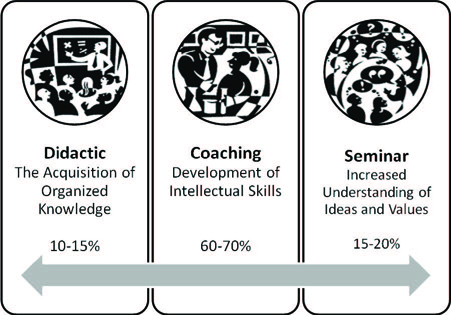
For some reason, these beliefs didn't quite stick in American education for awhile, and it wasn't until the 1980s, when philosopher and educator Mortimer Adler wrote The Paideia Proposal: An Educational Manifesto that more educators began to learn more about the Socratic or Paideia Seminar as the strategy is also called, from the Greek Paideia, meaning education or upbringing of a child. If this philosophy enabled students to not only practice reading, writing, speaking, listening, but also provided an opportunity for social participation in dialogues with peers and the teacher as coach, why did more teachers not implement this pedagogically sound strategy in the past? If it worked for Socrates, how could it fail? The answers are varied and complicated, but here's mainly why:
Socrates would definitely smile if he saw how our technology enhances the Socratic Seminar to the Nth degree. Discussions are no longer confined to the four walls of a classroom. With synchronous and asynchronous web tools, Socratic Seminars become ongoing global conversations extending well beyond the school day. Technology has also made it easy for our shy students, our ELLs, and any student facing academic challenges to participate as actively as the most advanced.
Socratic seminars encourage students to internalize the art of divergent thinking as they analyze print or non print text. The technique motivates students to engage in discussions, not debates, through open-ended questions that have no "right answers" but can be answered effectively if the student proves his/her point with textual evidence.
- Some teachers are often scared to turn control of the classroom over to students, which is one of the Paideia principles.
- Some teachers often think low achieving students can't possibly have anything thought-provoking to say.
- Some teachers often think discussing the answers takes precedence over pondering how questions presuppose other questions.
- Some teachers often don't respond to student questions with further questions. They may think the teacher must simply give the answer.
- Some teachers don't know how to stimulate thinking by teaching students to generate original questions.
Socrates would definitely smile if he saw how our technology enhances the Socratic Seminar to the Nth degree. Discussions are no longer confined to the four walls of a classroom. With synchronous and asynchronous web tools, Socratic Seminars become ongoing global conversations extending well beyond the school day. Technology has also made it easy for our shy students, our ELLs, and any student facing academic challenges to participate as actively as the most advanced.
Socratic seminars encourage students to internalize the art of divergent thinking as they analyze print or non print text. The technique motivates students to engage in discussions, not debates, through open-ended questions that have no "right answers" but can be answered effectively if the student proves his/her point with textual evidence.
Please visit this Livebinder filled with resources for carrying out Socratic Seminars in your class.
 Tech Tools Enhancing Socratic Seminar Experience.
Annotation/Bookmarking Tools
Before students engage in a Socratic discussion, they must closely read or watch a text, annotate, take notes about the text, generate original questions, or answer the teacher's questions, recording these task on paper, sticky notes or index cards. In the 21st century class, the following bookmarking tools make it easy for students to read, take notes, annotate, record and share their textual evidence to support their responses.
 1.) Diigo.com helps students understand how to properly find relevant content, underline/highlight that content, and then remember it. Diigo.com has add-on tools for a variety of browsers, so students can collect specific content while browsing the web and then add it to the My Library Cloud in the Diigo.com server to be accessed again and again. When students find information they need, they can digitally highlight the text, add an interactive sticky note with their comments, or questions, and save it to My Library Cloud for future use. Students can also bookmark a page and organize pages by tags. They can label a page mark to read later if they want the teacher to approve the relevancy of the text first, and even archive a page so it's there forever. Diigo.com's facilitates active e-reading because of the annotation feature using e-sticky notes as well as the capture feature which lets students capture an image of a particular section of text, then use shapes, arrows or text for students to annotate. Diigo.com lets students revisit their highlighted content using their computer, I-Pad or smart phone, and share their selected content with others for collaborative projects.
 2.) Marker.to-helps students to highlight and share evidence for their arguments via Twitter and Facebook. A class can have a Socratic discussion enhanced by Twitter. For example, the teacher opens the class Twitter page on the smartboard to see the class Twitter stream. Marker.to makes it easy for students to revisit corroborative content they highlighted, click share via Twitter, and voila the entire class now has full view of the highlighted content. Marker.to also gives you the option to organize content through tagging, so students can easily find, highlight and tag their textual evidence prior to a discussion and easily access it when needed by searching the tags.
 3.) Webklipper.com also helps students to highlight, annotate on virtual sticky notes, and share evidence to support their responses in a Socratic discussion. The site needs no registration, but like Diigo.com, if students do register, they can save their content on the site to access later. Webklipper.com also allows sharing via Twitter or Facebook. Again, teachers can show the real time streaming of comments and content highlighted by students to enhance the seminar experience.
Back channeling in a Socratic Seminar- During a Socratic Seminar, only one student should speak at a time. While students listen to each speaker, anyone of these tech tools allows students to write their comments and response for the questions posed by the seminar's facilitator, and respond to whatever each speaker says. Students can add their notes, links for textual evidence, and general thoughts about the discussion as they listen to each speaker. The teacher will also have a record of every student's thoughts as they listen to the discussion.
Enhance your Socratic Seminar with a Guest. Invite parents, authors, administrators, another class in another state, or country, community partners and experts in the field to join a Socratic Seminar.
Asynchronous tools to extend discussions beyond the school day. On some occasions one class period may not be enough to have a thorough discussion of a topic. The best Socratic Seminars are the ones where students raise more and more relevant questions exploring a topic thoroughly. Why not use one of these asynchronous tools to continue the conversation at home or to invite a guest to add his/her thoughts. Capitalize on students' excitement to discuss a topic by posing all of the questions which may have gone unanswered due to time constraints.
Please share how you have used synchronous or asynchronous tech tools to support Socratic Seminars in your class. When our students have opportunities to engage in intelligent dialogue with their peers and teachers on a variety of subjects, they acquire the lifelong skill of divergent thinking which is at the core of our democracy.
Subscribe to:
Posts (Atom)
